




What Is Technical SEO and Why Does Your Website Need It?


Technical SEO is the process of optimizing your website’s infrastructure not its words, but its wiring so search engines can actually find, crawl, render, understand, index, and serve your pages. In the simplest terms: content SEO decides what a page says, technical SEO decides whether search engines can access and understand it in the first place.
I’ve spent the last three years auditing sites where the content team did everything right: solid keyword research, well-structured articles, strong internal messaging and rankings still didn’t move. Nine times out of ten, the problem wasn’t the writing. It was something upstream: a robots.txt file quietly blocking a section of the site, a canonical tag pointing to the wrong URL, or a JavaScript framework rendering content Googlebot never actually saw. That’s the part of SEO nobody notices until it’s broken.
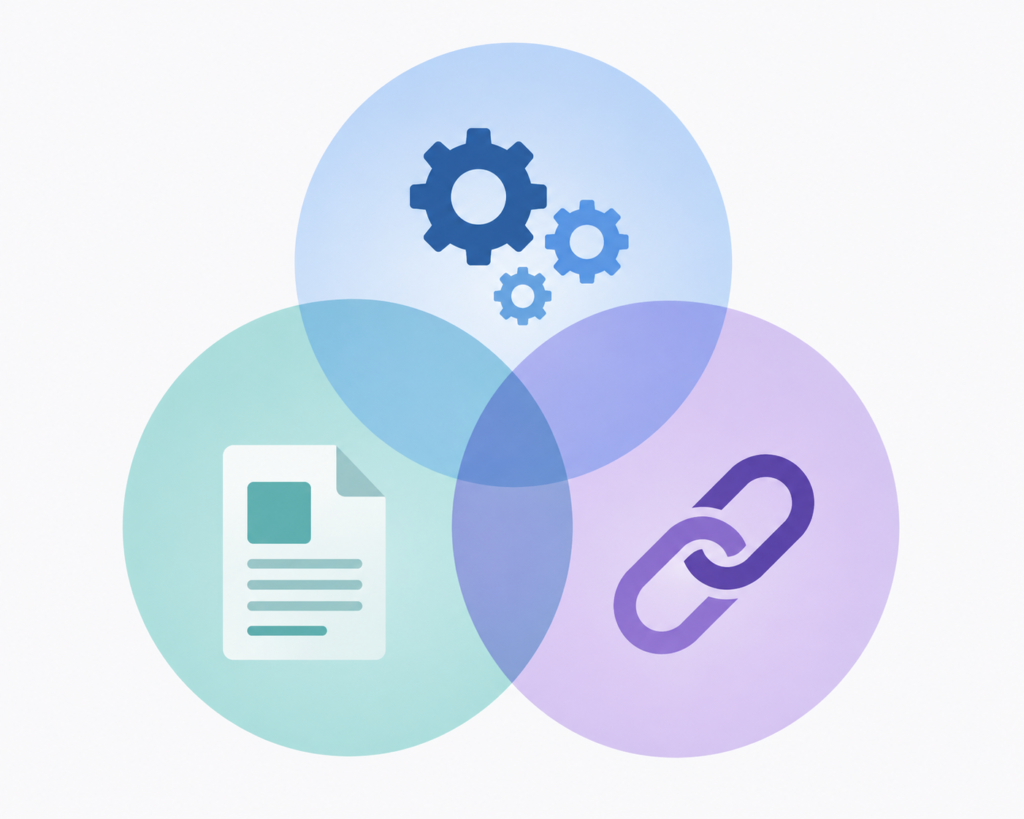
It helps to think of SEO as three connected layers working together:
- Content SEO: what the page says (topic coverage, search intent, depth)
- Technical SEO: whether search engines can access and understand the page efficiently
- Off-page SEO: how authority and reputation are built externally (backlinks, mentions)
Technical SEO itself covers a wide surface area: crawlability, indexability, rendering, site architecture, page performance, mobile SEO, structured data, JavaScript SEO, and security. None of these are optional extras they’re the foundation everything else sits on.
Here’s the honest caveat I give every client before we start an audit: meeting Google’s basic technical requirements doesn’t guarantee rankings but failing them can keep your pages out of Google Search entirely. Google itself is direct about this in its documentation on technical requirements for Search a page needs to be crawlable, return an HTTP 200 status, and contain indexable content just to be eligible to compete. After that, relevance and content quality take over.
That’s really what this guide is about: not chasing a ranking hack, but making sure your site isn’t accidentally locking search engines or increasingly, AI systems out of content you’ve already worked hard to create.
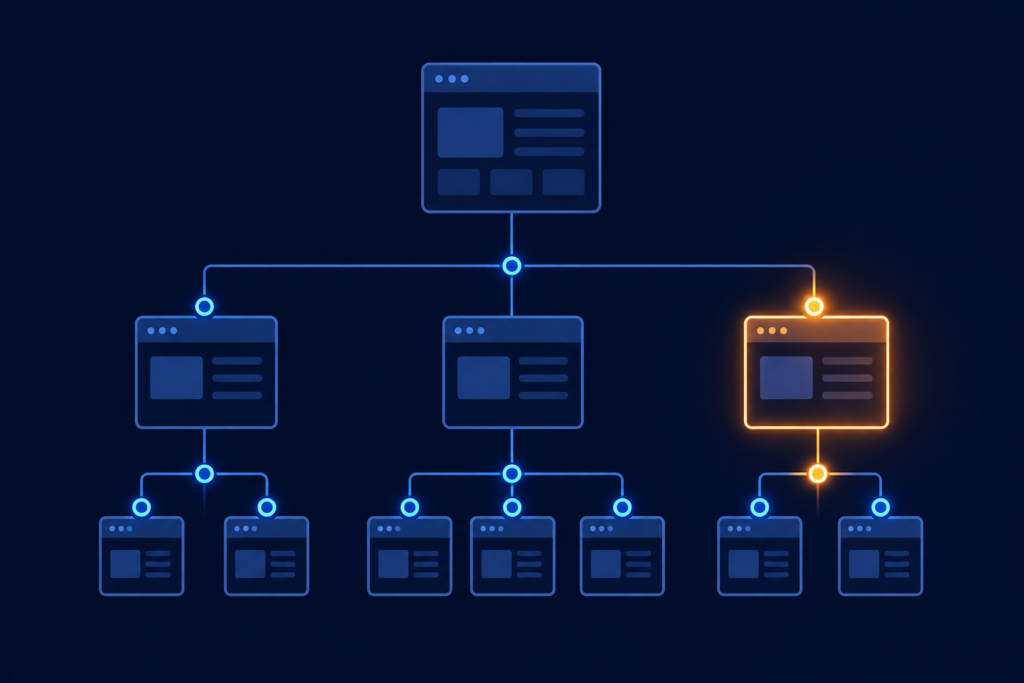
What Is Technical SEO and How Does It Work?
What Does Technical SEO Mean in Simple Terms?
Strip away the jargon and technical SEO basics come down to one idea: you’re optimizing your website’s technical foundation, not its content. If content SEO is about writing a great answer, technical SEO is about making sure the search engine can even open the door to read it.
This is where a lot of beginners get confused between “SEO” as a broad umbrella and “Technical SEO” as one discipline inside it. General SEO includes keyword strategy, content quality, backlinks, and user experience. Technical SEO is narrower it’s specifically the plumbing: server responses, crawl access, site speed, code structure, and indexing signals.
How Does Technical SEO Help Search Engines Understand a Website?
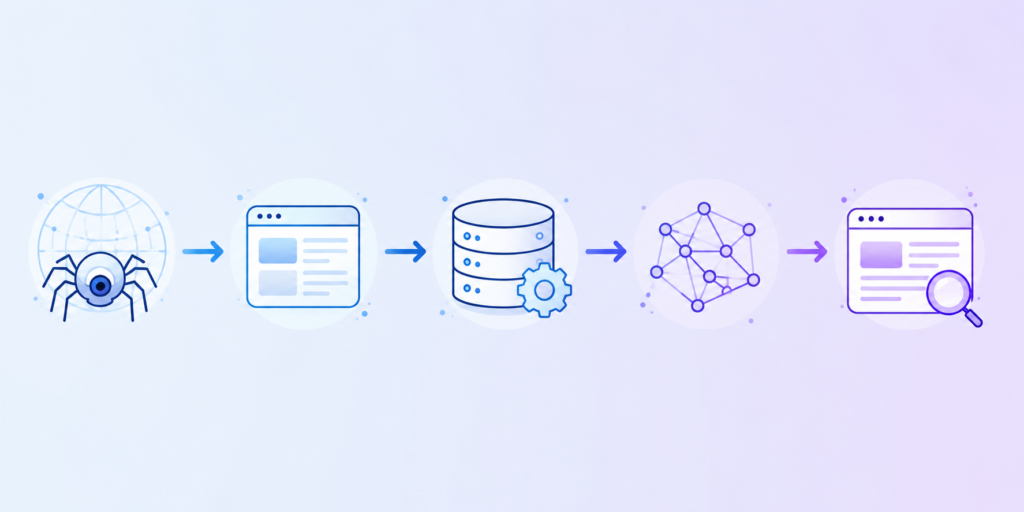
Every page on your site goes through the same journey before it can rank for anything. Based on my experience running audits, I always walk clients through this sequence because it makes the “why” behind every technical fix obvious:
Discover → Crawl → Render → Understand → Index → Serve
- Discover: Google finds your URL (via links, sitemaps, or external mentions)
- Crawl: Googlebot requests the page
- Render: Google processes the page like a browser would, including JavaScript
- Understand: Google interprets the content, structure, and context
- Index: Google stores the page in its database
- Serve: The page becomes eligible to appear in search results
If any single step in that chain breaks, everything downstream fails too. I’ve seen perfectly written content sit invisible in Search Console for months because step two crawling was blocked by a single misconfigured line in robots.txt.
What Are the Four Main Stages of Technical SEO?
Zooming out, technical SEO work generally clusters around four core stages:
| Stage | What It Covers | What Breaks Without It |
| Crawling | Can Googlebot access the page? | Blocked resources, server errors |
| Rendering | Can Google see the full content? | JavaScript-only content, hidden text |
| Indexing | Should this page be stored? | Noindex tags, duplicate content, weak canonicals |
| Serving/Ranking | Can it compete in results? | Poor relevance, slow experience |
What Are Google’s Basic Technical Requirements for a Page to Appear in Search?
Google’s own technical requirements documentation lays out the minimum bar in plain terms: Googlebot must not be blocked from the page, the server must return an HTTP 200 status, and the page must contain indexable content. That’s it, that’s the floor.
What I always stress to clients: clearing this bar gets you into the race, it doesn’t win it. I’ve audited sites that technically satisfied every one of these requirements and still underperformed because the content itself didn’t match search intent. Technical SEO removes obstacles that don’t manufacture relevance.
Why Is Technical SEO Important for Search Rankings and Website Performance?
How Does Technical SEO Improve Crawlability and Indexing?
This is the part of the job I find myself explaining most often to non-technical stakeholders: you can’t rank a page Google hasn’t indexed, and you can’t index a page Google can’t crawl. Technical SEO is what keeps that pipeline open.
In practice, this means:
- Search-engine access: making sure Googlebot isn’t blocked by server rules or robots.txt
- URL discovery: giving Google clear paths to find new and updated pages (internal links, sitemaps)
- Crawl efficiency: not wasting Googlebot’s limited attention on low-value or duplicate URLs
- Indexability: controlling which pages should and shouldn’t be stored
- Recrawling: making sure updated content gets picked up again in a reasonable timeframe
On larger sites especially, I’ve found crawl efficiency is the most overlooked lever. If Googlebot is spending its budget crawling filtered product URLs or paginated archives nobody needs indexed, your genuinely important pages get crawled less often.
How Can Technical SEO Improve User Experience?
Technical SEO and UX overlap more than people expect. Page speed, mobile usability, stable navigation, and accessible markup aren’t just “nice to have” they directly shape whether a visitor sticks around long enough to convert. A site that’s fast and stable for Googlebot is, almost by definition, faster and more stable for real users too.
How Does Technical SEO Support Content and Off-Page SEO?
Here’s something I try to get clients to internalize early: technical SEO isn’t a competing priority to content and link building it’s the thing that makes both of them work. A brilliant blog post buried three clicks deep with no internal links pointing to it will underperform a mediocre post that’s properly linked and crawlable. Technical SEO enables:
- Content discovery (Google can actually find new content)
- Internal linking (context and link equity flow properly)
- Backlink value distribution (authority moves through your site instead of getting stuck)
- Organic traffic growth
- Content marketing and link-building ROI

Can Technical SEO Improve Rankings and Organic Traffic?
I want to be straight with you here, because I think a lot of agencies oversell this: technical SEO can remove barriers to crawling and indexing, and it can improve user experience through better performance. What it does not do is act as a guaranteed ranking switch. Relevance and content quality remain essential you can have a technically flawless site that still doesn’t rank because it doesn’t answer the query as well as a competitor.
What Business Outcomes Can Technical SEO Support?
When I report results to clients, I try to tie technical work back to numbers that actually matter to the business, not just crawl stats:
- Organic traffic
- Engagement (time on site, pages per session)
- Conversions
- Sales
- Revenue
- Lead generation
That connection technical fix to business metric is what separates a useful SEO report from a vanity one.
How Does Technical SEO Differ From On-Page, Off-Page, and Content SEO?
I get asked some version of “isn’t this all just SEO?” almost every week. It is but treating it as one undifferentiated blob is exactly how things get missed. Each discipline has a distinct job, and understanding the boundaries actually makes it easier to diagnose why a page isn’t performing.
| SEO Type | Main Focus | Examples |
| Technical SEO | Website infrastructure | Crawling, indexing, speed |
| On-page SEO | Page optimization | Keywords, headings, content |
| Content SEO | Search-intent coverage | Guides, blogs, topical authority |
| Off-page SEO | Authority | Backlinks, mentions |
| Local SEO | Local visibility | GBP, citations, local pages |
What Is On-Page SEO Optimization?
On-page SEO optimization is everything you control directly on the page itself: keyword usage, title tags, headings, body content, internal links, image optimization, and metadata. It’s the layer most people think of first when they hear “SEO” but it only works if the technical layer beneath it is functioning.
What Is Off-Page SEO?
Off-page SEO is about authority built outside your own site backlinks, digital PR, and brand mentions. Based on my experience, this is the piece most often disconnected from technical SEO in people’s minds, but they’re deeply linked: a backlink pointing to a page with a broken canonical or a noindex tag is authority essentially wasted.
What Is Link Building in SEO?
Link building is the deliberate process of earning backlinks external links from other sites because backlinks remain one of the strongest trust signals search engines use. It’s worth distinguishing:
- Internal links: connect your own pages, distribute link equity, and help crawlability
- External links (backlinks): build domain-level authority and trust
Technical SEO supports link equity flow in a very concrete way: if your internal linking structure and canonical tags are clean, the authority from an earned backlink actually reaches the pages that need it, instead of getting trapped on an orphaned or duplicate URL.
How Do Technical, On-Page, Content, and Off-Page SEO Work Together?
I like to describe this as an ecosystem rather than four separate checklists, because that’s genuinely how it behaves in practice:
- Technical SEO opens the door (crawlable, indexable, fast)
- Content SEO gives the search engine something worth serving (relevant, well-structured answers)
- On-page SEO makes that content legible and targeted (keywords, headings, metadata)
- Off-page SEO builds the trust that tips close rankings in your favor (backlinks, mentions)
Skip any one of these, and the others underperform. I’ve watched content teams pour months into a content cluster that never gained traction not because the writing was weak, but because a technical issue kept half the cluster out of the index.
What Are the Most Important Technical SEO Factors?
I think of technical SEO less as a checklist and more as a system each factor compensates for or reinforces the others. Here’s the core set I check on every audit, based on what I’ve found actually moves the needle.
Site architecture: A logical hierarchy (home → category → subcategory → page) with clean URL structure, clear navigation, breadcrumbs, and shallow crawl depth makes it easy for both Googlebot and users to understand where they are. I’ve seen sites bury important pages five clicks deep and then wonder why they never get crawled often.
Crawlability: This is about whether Googlebot can actually reach your pages: robots.txt rules, internal link paths, and crawl budget all play a role here. On large sites, wasted crawl budget on low-value URLs is one of the most common issues I find.
Indexability: Controlled through no index tags, canonical tags, and duplicate URL cleanup. Google Search Console’s Page Indexing report is where I always start diagnosing this.
XML sitemaps: Sitemaps help Google discover URLs faster, especially on large sites, and should include accurate last-modified dates. A stale or error-filled sitemap does more harm than having none.
Robots.txt: Controls what Googlebot can crawl, not what gets indexed. This is one of the most common misunderstandings I run into with clients: robots.txt is not a reliable deindexing mechanism. A page you block in robots.txt can still get indexed if it’s linked to from elsewhere — just without content Google can read.
Canonical tags: Tell search engines which version of a duplicate or near-duplicate URL is the “preferred” one. Self-referencing canonicals, cross-domain canonicals, and consistent implementation matter far more than people expect. I’ve fixed ranking issues on multi-million-dollar sites that came down to one wrong canonical directive.
HTTP status codes and redirects: 200s, 301s, 302s, 404s, and 410s each send a distinct signal. Redirect chains and loops waste crawl budget and dilute link equity, so I always flag them early in an audit.
HTTPS: Secure connections (SSL/TLS) are now table stakes, not a differentiator. Watch for mixed content and make sure HTTP→HTTPS redirects are clean, not chained.
Internal linking: Drives page discovery, crawl paths, contextual relevance, and link equity distribution. Orphan pages with no internal links pointing to them are invisible to both users and crawlers no matter how good the content is.
Structured data / schema markup: Helps search engines understand what type of content a page represents (Organization, Article, Breadcrumb, Service, etc.) and can make a page eligible for relevant rich results though it never guarantees them.

How Do Core Web Vitals Affect Technical SEO and User Experience?
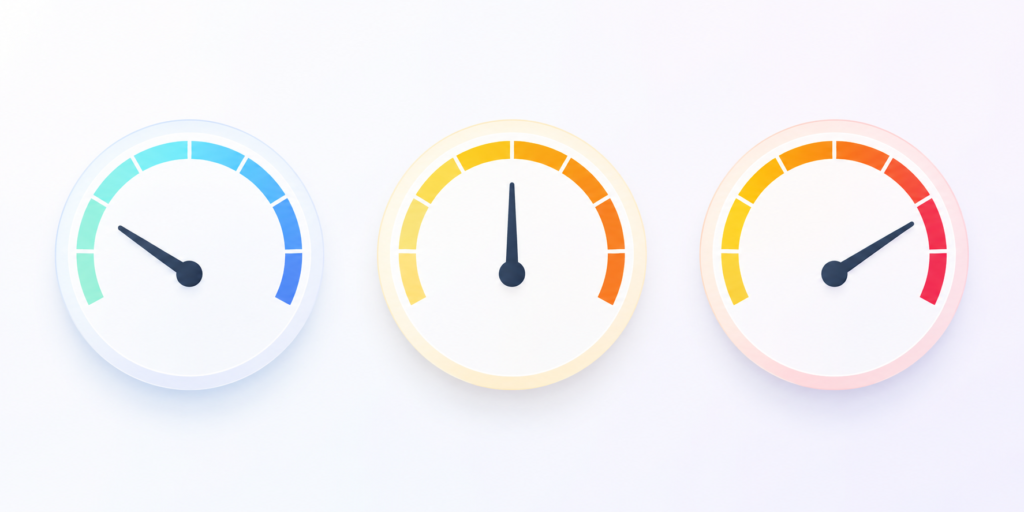
Core Web Vitals are the metrics Google uses to measure real-world page experience, and in my experience they’re the single most misunderstood part of technical SEO. People either dismiss them entirely or treat them as a magic ranking lever. Neither is accurate. The current three metrics are:
| Metric | What It Measures | Target |
| LCP (Largest Contentful Paint) | Loading speed of the main content | ≤ 2.5 seconds |
| INP (Interaction to Next Paint) | Responsiveness to user interaction | < 200 milliseconds |
| CLS (Cumulative Layout Shift) | Visual stability while loading | < 0.1 |
Google’s own Core Web Vitals documentation sets these exact thresholds, and I use them as the baseline on every audit I run. You can measure all three through Google Search Console (field data from real users), PageSpeed Insights, or Lighthouse (lab data).
Can better Core Web Vitals automatically improve rankings?
No and I say this directly to every client who asks. Core Web Vitals are one input into Google’s broader page-experience and ranking systems, working alongside relevance and content quality. Google’s own Search Advocate, John Mueller, has publicly pushed back on the idea that Core Web Vitals are a “giant factor” capable of explaining major ranking losses on their own, according to Search Engine Journal’s coverage of his comments. Strong technical performance doesn’t replace useful, relevant content, it removes friction around it.
What actually improves Core Web Vitals, based on the fixes I implement most often:
- Image compression and modern formats
- Faster server response times
- Minified CSS and JavaScript
- Reducing third-party script bloat
- Font-loading strategy (to prevent layout shift)
- Caching and CDN usage
- Reserving space for dynamically loaded elements
What Do Real Technical SEO Case Studies Show About Business Performance?
I want to be upfront about how I use case studies with clients: they’re evidence of what’s possible, not a promise of what will happen on your site. Every one of these involved multiple contributing factors, so I always label them as reported results, not guaranteed outcomes.
| Company | Technical Work | Reported Result |
| NDTV | Core Web Vitals optimization | 55% improvement in LCP; 50% reduction in bounce rate |
| Vodafone Italy | LCP improvements | 31% improvement in LCP; 8% increase in sales |
| MX Player | Video structured data | 3×+ growth in Google traffic; 100% increase in video page views per session |
| Saramin | SEO investment + structured data | 2× organic Search traffic |
| Redbus | Core Web Vitals optimization | 80–100% mobile conversion-rate improvement |
A few notes worth sitting with, based on how I read these:
NDTV improved LCP by 55% and reported a 50% drop in bounce rate, per Google’s web.dev case study but the improvement came alongside other product changes, so the full result shouldn’t be attributed to Core Web Vitals work alone.
Vodafone Italy’s 31% LCP improvement was reported alongside an 8% increase in sales, a good illustration of how performance gains show up after a visitor arrives, not just in rankings.
MX Player saw more than 3× growth in Google traffic and a 100% increase in video page views per organic session after implementing video structured data, per Google’s own case study a clear example of structured data working when it accurately matches real content, not as a ranking shortcut.
Saramin doubled its organic Search traffic, but Google attributes this to a broader SEO investment combined with relevant structured data, not schema markup in isolation.
Redbus reported an 80–100% mobile conversion-rate improvement tied to Core Web Vitals work, along with ranking uplift across global properties, per web.dev’s business-impact case studies.
What these case studies actually teach: Measure business outcomes, not just Lighthouse scores. Connect every technical fix back to organic traffic, conversions, or revenue and resist the urge to claim causation where the evidence only supports correlation.

What Is a Quick Technical SEO Audit Checklist?
This is the exact shortlist I run through first on any new site before diving into anything advanced, I want answers to these basics.
Crawlability
- Robots.txt isn’t blocking important sections
- XML sitemap is submitted, accurate, and error-free
- Internal links create clear paths to key pages
- No orphan pages (unlinked from anywhere on the site)
Indexability
- No accidental noindex tags on important pages
- Canonical tags point to the correct preferred URL
- Google Search Console’s Page Indexing report shows no unexpected exclusions
- Duplicate URLs are consolidated
Performance
- LCP ≤ 2.5 seconds
- INP < 200 milliseconds
- CLS < 0.1
- Images compressed, caching and CDN in use
Mobile
- Responsive design with no horizontal scrolling
- Touch elements sized and spaced appropriately
- Mobile load times match desktop expectations (mobile-first indexing means this is the version Google evaluates)
Security
- HTTPS active sitewide
- No mixed content warnings
- HTTP→HTTPS redirects are direct, not chained
Run through these five categories quarterly at minimum, and always immediately after a migration, redesign, or major development change that’s when I catch the most damage.
How Does Technical SEO Affect AI Search, AI Overviews, and AI Mode?
This is the question I get most from clients right now, and my answer is consistent: AI search doesn’t replace technical SEO, it raises the stakes on doing it well.
According to Google’s own documentation on AI features, there are no additional technical requirements specifically for appearing as a supporting link in AI Overviews or AI Mode. A page still needs to already be indexed and eligible for normal Google Search crawl access, structured data, and visible content all matter exactly as they did before. What’s changed is how much cleaner that foundation needs to be.
A few things I now prioritize specifically with AI visibility in mind:
- Clean, semantic HTML: clear content structure that’s easy for machines to parse, not just humans
- Consistent entity naming: using the same terms for the same concepts throughout a site helps machine understanding
- Structured data accuracy: Organization, Article, Breadcrumb, and Service schema all support how AI systems interpret what a page is about
- Strong internal linking: reinforces relationships between related concepts across your site
One important update worth flagging: Google’s Search Central updates page confirms the FAQ rich-result feature stops appearing in Google Search starting May 7, 2026. I still recommend using FAQ sections for genuine user value and topical coverage; just don’t sell them internally as a rich-result play anymore.
Is “AI SEO” a replacement for technical SEO?
No. It’s an extension of the same fundamentals: crawlability, indexability, clear structure, and content that actually matches what it claims to be about.
What Are the Most Frequently Asked Questions About Technical SEO?
What is technical SEO in simple terms?
It’s the process of optimizing your website’s infrastructure crawlability, indexing, speed, and structure so search engines can access and understand your content. It’s different from content SEO, which is about what a page says.
Is technical SEO necessary for every website?
Yes. Even a small business site needs basic crawlability, indexability, mobile usability, and reasonable page speed to compete in search results.
Is technical SEO different from on-page SEO?
Yes. On-page SEO covers what’s visible and controllable on the page itself keywords, headings, content. Technical SEO covers the infrastructure underneath: crawl access, indexing signals, site speed, and code-level structure.
Does technical SEO improve Google rankings?
Indirectly. It removes barriers to crawling and indexing and improves user experience, but it doesn’t guarantee rankings on its own relevance and content quality still decides who wins.
How often should you perform a technical SEO audit?
Based on my experience, quarterly for most sites, with immediate audits after any migration, redesign, or major development change that’s when things break most often.
What tools are used for technical SEO?
Google Search Console, PageSpeed Insights, Lighthouse, and crawlers like Screaming Frog cover most day-to-day audit needs.
Does technical SEO help AI search visibility?
Yes. Pages need to already be indexed and eligible for normal Google Search to appear in AI Overviews or AI Mode, so the same technical fundamentals of crawlability, indexability, and structured data apply.
How do I do SEO for my website?
Start with the basics: confirm Google can crawl and index your site, fix Core Web Vitals issues, build out relevant content around real search intent, and earn backlinks over time. Technical SEO is the foundation the rest builds on.
What Is the Final Technical SEO Process You Should Follow?
After three years of running these audits, I’ve boiled my process down to one repeatable loop: Audit → Identify → Prioritize → Fix → Validate → Monitor → Improve.
Start by auditing crawlability, indexability, architecture, performance, mobile, and security in that order. Prioritize fixes using impact versus effort: high-impact, low-effort issues get fixed first; high-impact, high-effort issues get planned properly; everything else gets batched or deprioritized. Validate every fix through URL Inspection, Search Console, and PageSpeed Insights before considering it done. Then monitor indexing, organic traffic, Core Web Vitals, and conversions on an ongoing basis technical SEO isn’t a one-time project, it’s maintenance.
If there’s one thing I want you to take from this guide, it’s that technical SEO isn’t glamorous, and it rarely gets credit when it’s working correctly; you only hear about it when something breaks. But it’s the layer everything else depends on. Great content and strong backlinks can’t compensate for a site Google can’t crawl or a page that takes six seconds to load.

If you’re seeing traffic plateau, indexing issues you can’t explain, or you’re heading into a migration or redesign, that’s usually the moment a proper technical SEO audit pays for itself. That’s exactly the kind of work our team at Orbital Rank does day to day from full technical audits to Core Web Vitals optimization, JavaScript SEO, schema implementation, and ongoing monitoring. If you want a second set of eyes on your site, reach out to our team and we’ll walk you through what we find.